Now that I have time for hobbies again I wanna dive right in to building up a home lab. Right now I just have a Netgear router that reached end of life, and a NAS i’d like to make accessible remotely, and a DIY router seems like the correct next step for me. I’m very interested in ad-blocking network wide and someday I’d like to host my own little webpage, but for now I’m really just barely getting started.
I’m information gathering, I don’t know what I don’t know and my networking skills are pretty weak anyway. But even if your needs and desires have nothing to do with mine, I also just like to hear people talk about their set ups. Please? 🌞
You must log in or register to comment.
The layout I’m designing around is inline: ISP router, then a small dual-ethernet box doing firewall and DNS filtering, then your LAN. For a start, I’d put OPNsense on a cheap dual-NIC mini PC. You get network-wide blocking through a plugin and a VPN to reach your NAS, and VLANs can wait until you need them. I’m biased, since I’m building a box with that exact layout. What I can’t settle: for someone starting out, is an all-in-one box less scary, or does it hide the stuff you’d want to learn?
Acronyms, initialisms, abbreviations, contractions, and other phrases which expand to something larger, that I’ve seen in this thread:
Fewer Letters More Letters AP WiFi Access Point DHCP Dynamic Host Configuration Protocol, automates assignment of IPs when connecting to a network DNS Domain Name Service/System ISP Internet Service Provider IoT Internet of Things for device controllers LXC Linux Containers NAS Network-Attached Storage NAT Network Address Translation NVMe Non-Volatile Memory Express interface for mass storage NVR Network Video Recorder (generally for CCTV) PCIe Peripheral Component Interconnect Express PiHole Network-wide ad-blocker (DNS sinkhole) PoE Power over Ethernet SATA Serial AT Attachment interface for mass storage SSD Solid State Drive mass storage Unifi Ubiquiti WiFi hardware brand VPN Virtual Private Network
[Thread #130 for this comm, first seen 15th Oct 2026, 21:00] [FAQ] [Full list] [Contact] [Source code]
Currently running OPNsense on a small Dual-Nic Shuttle PC with an Pentium G4560 and 4 gigs of ram and it’s been handling everything I throw at it perfectly fine. Ive got 16 Interfaces, around 10 Wireguard Peers and a SIT tunnel to HE and Im still getting Line Speeds through the firewall.
I’ve never gotten DIY routers including opnsense to give gigabit line speeds once VLANs are enabled.
OpenWRT all the way.
Skynet firewall
PiHole
Stable IP addresses and a private interface for family phones/laptops/pcs
Guest network for nasty Roku TV/peleton
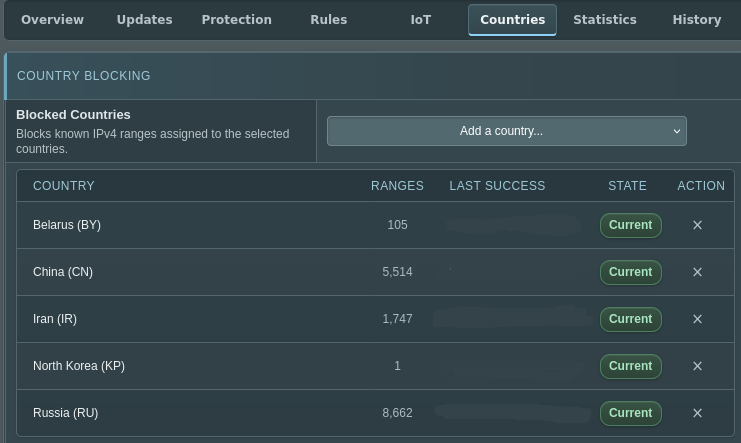
EDIT: my favorite thing about Skynet is the new-ish ability to filter by country
I never even thought about a guest network for different services. Why do you do that, if you don’t mind? Privacy?
You could configure different settings, such as preventing the device from connecting to ad servers. You also prevent it from scanning your network to learn about all your devices, since all it would be limited to that isolated network.
Does peloton do that!? 🥲
I don’t know. Is it internet connected? If so I wouldn’t trust it…
Many home grade routers allow you to set up a guest WiFi network though so you may be able to isolate it that way if you’re concerned/can determine what telemetry it’s sending from the privacy policy or other reports.
This article talks about their website’s standard creepy tracking cookies and stuff, which depressingly everyone does. https://blog.avast.com/what-peloton-knows-about-you-avast
But if it has Bluetooth and WiFi it has a lot of potential for tracking all sorts of things. I don’t have one and don’t know if they’re using that potential, but it’s there. It would be interesting to investigate.